
Challenge 1 - Replicating Oracle Data Using Datastream
< Previous Challenge - Home - Next Challenge>
Introduction
Datastream supports the synchronization of data to Google Cloud databases and storage solutions from sources such as MySQL and Oracle.
In this challenge, Datastream backfills the Oracle FastFresh schema and replicates updates from the Oracle database to Cloud Storage in real time.
Description
- In Cloud Console, navigate to Datastream and click Create Stream. A form is generated. Populate the form as follows and click Continue:
- Stream name:
oracle-cdc - Stream ID:
oracle-cdc - Source type:
Oracle - Destination Type:
Cloud Storage - All other fields:
Keep the default value
- Stream name:
- In the Define & Test Source section, select Create new connection profile. A form is generated. Populate the form as follows:
- Connection profile name:
orcl-retail-source - Connection profile ID:
orcl-retail-source - Hostname:
Hack Now! Find the database host name! - Port:
1521 - Username:
datastream - Password:
tutorial_datastream - System Identifier (SID):
XE
- Connection profile name:
-
Choose the connectivity method IP allowlisting, and then click Continue.
-
Click Run Test to validate the connection to the Oracle database, and then click Create & Continue.
-
The Select Objects to Include defines the objects to replicate, specific schemas, tables and columns and be included or excluded. Select the
FASTFRESH > ORDERStable: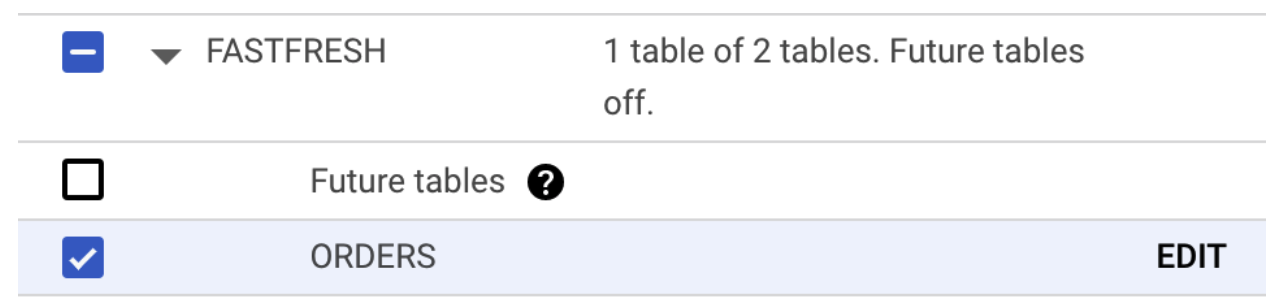
-
To load existing records, set the Backfill mode to Automatic, and then click Continue.
- In the Define Destination section, select Create new connection profile. A form is generated. Populate the form as follows, and then click Create & Continue:
- Connection Profile Name:
oracle-retail-gcs - Connection Profile ID:
oracle-retail-gcs - Bucket Name: The equivalent to
gs://${PROJECT_ID}-oracle_retail. This is the bucket you created earlier
- Connection Profile Name:
-
Leave the Stream path prefix blank and select JSON for Output format. Click Continue.
- Click Run Validation and, assuming no issues were found, click Create.
Success Criteria
- You’ve created a Datastream stream named oracle-cdc
- The oracle-cdc stream is setup to replicate the ORDERS table
- The oracle-cdc stream is pointing to bucket gs://${PROJECT_ID}-oracle_retail